
Connect your Apple Watch to ChatGPT in four steps
- Get PB-Runner on your iPhone. The watch app comes with it.
- When it asks for Apple Health access, tap Turn On All, then Allow.
- In ChatGPT, open Customize, then Plugins, find PB-Runner Running Coach and add it.
- Ask about your last run, or ask for your next session and say yes to put it on your watch.
Each step is below in full, with what to do if something doesn't work.
What you need
- An iPhone and an Apple Watch.
- PB-Runner on the iPhone, free to download. The watch app comes with it.
- A ChatGPT account. The free plan works, and so does Claude's.

1. Get the app and turn on Apple Health
Open PB-Runner on your iPhone and sign in with Apple. It asks for Apple Health access at first launch. The toggles start switched off, so tap Turn On All, then Allow. Tapping Allow alone grants nothing and no runs arrive.
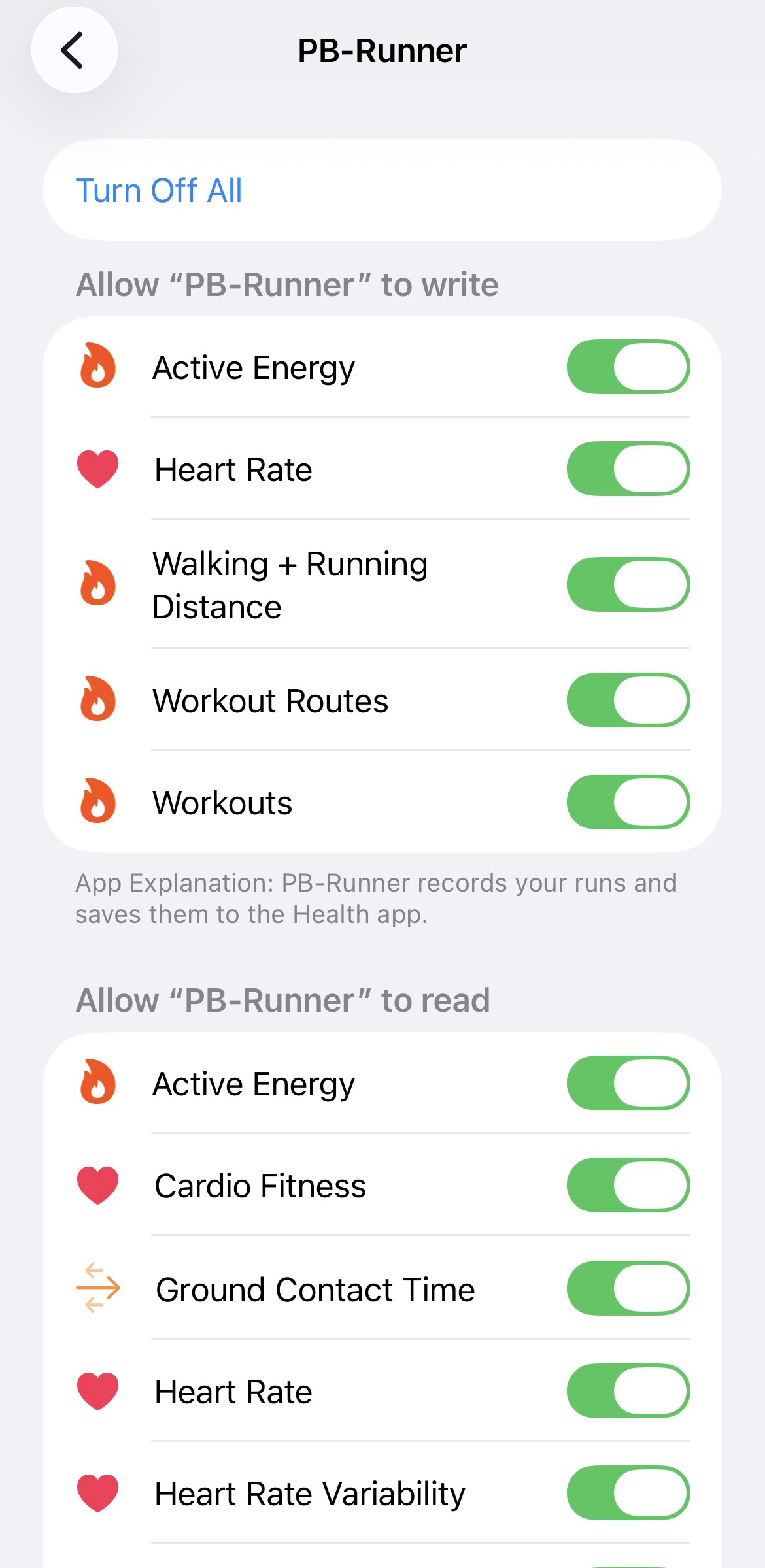
From then on, the runs you record with PB-Runner on the watch arrive by themselves. Runs recorded in another app, and runs from before you joined, come in from the Sync Runs screen on the Runs tab.
2. Add PB-Runner to ChatGPT or Claude
PB-Runner is listed as PB-Runner Running Coach in ChatGPT's plugin directory and in Claude's connector directory.
- ChatGPT: open PB-Runner Running Coach in ChatGPT, or go to Customize, then Plugins, and search for it. Add it.
- Claude: open PB-Runner Running Coach in Claude, or go to Settings, then Customize, then Connectors, and search for it. Click Connect.
- Sign in with the same Apple account you use in the PB-Runner app.

The account is the part to get right. A different account than the one in the app points your AI at an empty running history.
Step by step, with screenshots: the ChatGPT setup and the Claude setup.
3. Ask, and run it on your Apple Watch
Start a new chat and ask about your running, for example:
"Look at my last month of running and tell me what to work on first."
"Put a 5 x 1 km interval session on my watch for Thursday."
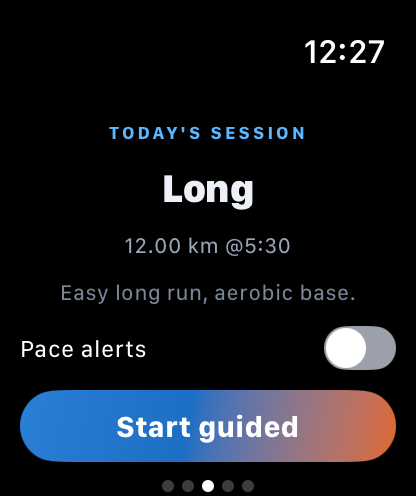
Your AI proposes the session and nothing is saved until you say yes. Then it lands in your Schedule in the app. Open the iPhone app with your watch nearby and the session reaches the watch, where PB-Runner plays it rep by rep, with your targets on screen and live cues.
Doesn't ChatGPT already connect to Apple Health?
ChatGPT has a Health feature of its own that can connect to Apple Health on an iPhone. As of November 2026, OpenAI has opened it in the United States only [1] [2], so in the UK, in France and elsewhere it isn't there yet.
PB-Runner is a running app, and it connects your runs to ChatGPT outside the US too. It carries every running metric your Apple Watch records, split by split, it works both ways, so the session ChatGPT writes goes back to your wrist, and it works in Claude as well.
What ChatGPT can see from Apple Health
A run recorded with PB-Runner on the watch carries heart rate second by second, pace, distance and elevation, cadence, stride length, ground contact time, vertical oscillation and running power, plus a rep by rep breakdown of every guided session. Older watches leave out the metrics they don't support.
Resting heart rate, heart-rate variability and sleep also come from Apple Health, so your AI can back a session off when you are not recovered. You choose what PB-Runner reads on Apple's own permission screen, and ChatGPT reads it through PB-Runner, not your whole Health app.
Every number, explained: every Apple Watch running metric in ChatGPT.
If something isn't working
| What you see | Why | What to do |
|---|---|---|
| No runs in PB-Runner | WhyAllow was tapped without Turn On All, so nothing was shared. | What to doIn the Health app: your profile, then Privacy, Apps and Services, PB-Runner. Turn the toggles on. |
| Runs from another app are missing | WhyOnly the runs you record with PB-Runner arrive by themselves. | What to doBring the others in from the Sync Runs screen on the Runs tab. |
| ChatGPT answers without your runs | WhyChatGPT is signed in with a different account than the PB-Runner app. | What to doSign in again in ChatGPT with the same account you use in the app. |
| The session isn't on the watch | WhyThe iPhone app hasn't passed it to the watch yet. | What to doOpen PB-Runner on your iPhone with your watch nearby. |
| No running power or form data | WhyThe run was recorded on the iPhone alone, or the watch doesn't measure it. | What to doWear the Apple Watch for the run. Older watches leave out what they can't measure. |
Things you can ask
- Plan my next 4 weeks for a sub-50 10K.
- Put 6 × 400 m on my watch for Thursday.
- How did today's run compare to last week?
- What could I run a half marathon in now?
- Move my long run to Sunday.
Apple Watch, Apple Health and ChatGPT: questions runners ask
Can I connect Apple Health to ChatGPT?
Yes. ChatGPT's own Apple Health connection is open in the United States only for now. For your running, PB-Runner does it outside the US too: it reads your runs from Apple Health on your iPhone and gives them to ChatGPT, on the free plan.
How do I connect my Apple Watch to ChatGPT?
Get PB-Runner on your iPhone, tap Turn On All, then Allow for Apple Health, and add PB-Runner Running Coach in ChatGPT, under Customize, then Plugins, with the same account. The watch app comes with the iPhone app.
Does ChatGPT work with Apple Health outside the US?
ChatGPT's own connection doesn't yet: as of November 2026, OpenAI has opened it in the United States only. PB-Runner isn't limited to the US, so ChatGPT can read your runs through it in the UK, in France and elsewhere.
How is this different from ChatGPT's own Health feature?
PB-Runner is built for running. ChatGPT gets every run with the running metrics your Apple Watch records, split by split, and it can write your next session and send it to your watch. It also works outside the US, and in Claude.
Can ChatGPT put a workout on my Apple Watch?
Yes. Ask for the session and say yes. It lands in your Schedule in PB-Runner, and the next time you open the iPhone app with your watch nearby it goes to the watch, where PB-Runner plays it with live cues.
Is it free?
Yes, to start. PB-Runner is free on the App Store, and the connection works on ChatGPT's free plan. Reading your runs, talking them through and saving a plan stay free, and your first training block plays in full on the watch with no card needed. What a subscription adds is on the plans page.
Which Apple Health data does ChatGPT see?
Your runs and their running metrics, plus heart rate, resting heart rate, heart-rate variability and sleep. You choose them on Apple's permission screen, and ChatGPT reads them through PB-Runner, not your whole Health app.
Do I have to record my runs with PB-Runner?
No. Runs you record with PB-Runner arrive by themselves. Runs from another app come in from the Sync Runs screen, and a run recorded on an Apple Watch usually comes across close to complete.
Do I need an Apple Watch, or does an iPhone work?
An iPhone on its own works: it records distance, pace, elevation, cadence and stride. Heart rate and running form need the watch. More on iPhone runs in ChatGPT, no watch needed.
Why are no runs showing up?
Usually Allow was tapped without Turn On All. In the Health app, open your profile, then Privacy, Apps and Services, PB-Runner, and turn the toggles on. If ChatGPT still sees nothing, it is signed in with a different account than the app.
How do I disconnect Apple Health from ChatGPT?
Remove PB-Runner Running Coach from your plugins in ChatGPT and it stops reading your runs. To stop PB-Runner reading Apple Health, turn its toggles off in the Health app, under Privacy, Apps and Services, PB-Runner.
Is there a ChatGPT app for Apple Watch?
PB-Runner doesn't put the ChatGPT chat itself on your wrist. It puts the sessions ChatGPT writes on your Apple Watch and plays them with live cues, then your run goes back to ChatGPT.
Sources, checked 19 November 2026
Where the fact about ChatGPT's own Apple Health connection comes from.